
Screenshots
App details
- Version
- 3.5.2.1 | 2.5.3850 | 2.5.3784 | 2.5.3646...
- Size
- 21.05 MB
- Updated
- November 18, 2024
- Requires
- Windows 8.1
- Language
- English | German | Spanish | French | It...
- License
- Free
- Developer
- Famatech
- Category
- Windows OS
SoftPas in:
This product is also available in the following languages:
About Advanced IP Scanner
Download Advanced IP Scanner – Free Network Scanning Tool for Windows
Overview
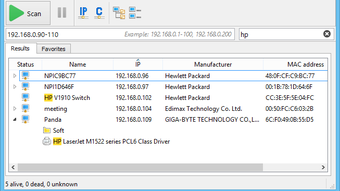
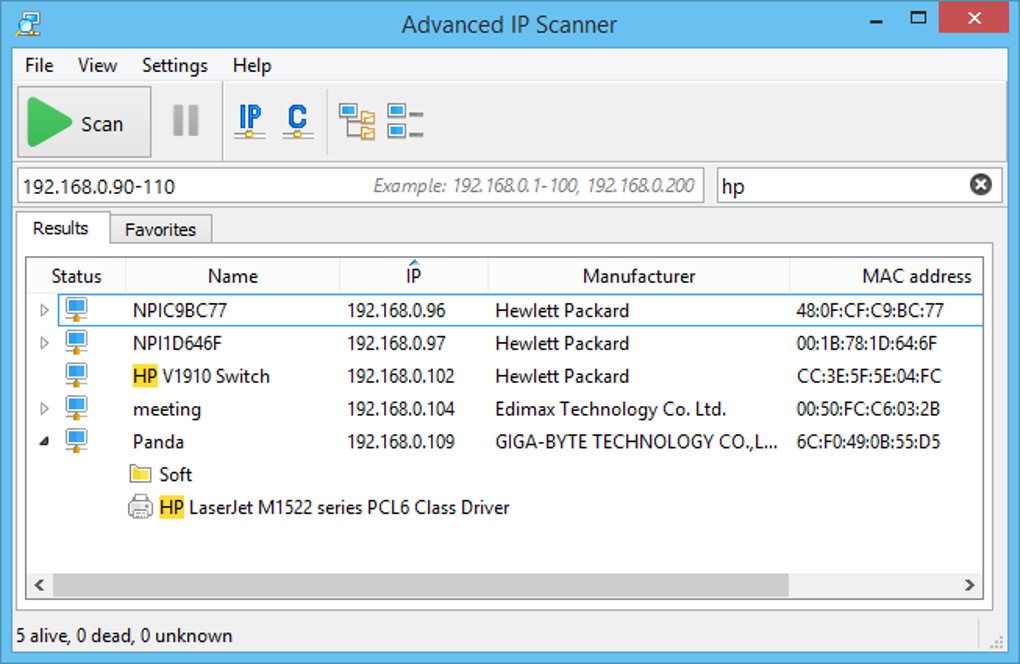
Advanced IP Scanner, developed by Famatech Corp., is a free, lightweight network scanning utility designed specifically for Windows PCs. The program quickly discovers every device connected to a local area network (LAN) and presents detailed information such as IP address, MAC address, hostname, vendor, and operating system. Its clean, intuitive interface features a single, prominent “Scan” button, a results pane that updates in real time, and a favorites tab where administrators can store frequently‑scanned machines for instant access. Whether you need to audit a small home network or manage a corporate office with dozens of workstations, Advanced IP Scanner delivers the essential data in just a few clicks. The tool also integrates with Famatech’s remote administration suite (RDP, Radmin) allowing users to control computers, shut them down, or launch remote sessions directly from the scan results. Because it runs as a portable executable, you can carry it on a USB stick and launch it on any Windows machine without a formal installation, making it ideal for on‑the‑go troubleshooting. In short, the application combines speed, simplicity, and powerful remote‑access features, positioning itself as a solid alternative to more complex scanners like Nmap while remaining completely free.
Key Features and Benefits
- Instant LAN discovery – scans up to 1,000 IP addresses per second.
- Portable execution – run from a USB stick without installation.
- Detailed device information – MAC, vendor, OS, and hostname.
- Remote control integration – launch RDP or Radmin sessions directly.
- Shared folder access – view and open files on any detected network share.
- Multi‑protocol support – detect FTP, HTTP, HTTPS services automatically.
- Customizable scan speed – choose between fast, balanced, or thorough modes.
- Favorites list – save frequently scanned IPs for one‑click rescans.
- Export results – save scan reports as CSV or HTML for documentation.
- Multi‑language UI – available in over 8 languages, including English, German, and Spanish.
Pros
- Completely free with no hidden fees or trial limitations.
- Portable – no installation required, perfect for field technicians.
- Fast scanning engine that handles large subnets efficiently.
- Integrated remote‑access tools simplify device management.
- User‑friendly interface suitable for beginners and seasoned admins alike.
Cons
- Only available for Windows; no native macOS, Linux, Android, or iOS versions.
- Advanced remote functions depend on external Radmin/RDP tools.
- Lacks deep packet inspection features found in more robust scanners.
- No built‑in vulnerability assessment or exploit modules.
- Limited reporting customization compared with enterprise‑grade solutions.
Installation & Usage Guide
Getting started with Advanced IP Scanner is straightforward. First, visit the official Famatech website and click the “Download” button. The download size is under 5 MB, and the file is a self‑extracting executable named AdvancedIPScanner.exe. Because the application is portable, you can choose to run it directly from the download folder or copy it to a USB flash drive for repeated use on different machines.
To launch, double‑click the executable. If you prefer a traditional installation, the installer offers an optional “Install” mode that creates a start‑menu shortcut and registers the program in Program Files. Regardless of the method, the first run will request administrative privileges so it can query the network adapter and retrieve MAC addresses.
Once the UI appears, simply press the large blue Scan button. The software automatically determines your local subnet (e.g., 192.168.1.0/24) and begins probing each address. Results populate in the lower pane, showing live status icons for online/offline devices. Clicking a row reveals a context menu with actions such as “Open Shared Folder,” “Ping,” “Wake‑On‑LAN,” and “Remote Control.” For targeted scans, you can type a specific IP range into the address bar at the top or import a list of addresses from a text file using the File → Import option.
Advanced IP Scanner is compatible with Windows 7, 8, 10, and 11 (both 32‑bit and 64‑bit editions). The portable version runs on any Windows environment that supports .NET Framework 4.5 or higher, which is included by default on modern Windows installations.
After a scan, you may export the results by selecting File → Export and choosing CSV or HTML. This feature is handy for creating inventory reports or sharing findings with team members who do not have the scanner installed.
FAQ & Conclusion
How do I perform a single‑IP scan?
Enter the exact IP address in the address bar at the top of the window, then click the Scan button. The program will probe only that address and display its status and details in the results pane.
Can Advanced IP Scanner detect hidden devices on a subnet?
The scanner uses ARP and ping requests to discover active hosts. While it reliably finds most devices, truly hidden or firewalled machines that block ICMP may not appear unless they respond to other protocols such as SMB or HTTP.
Is there a limit on the number of devices I can scan?
No artificial limit is imposed. The only practical constraints are the size of your network and the scan speed you select. For very large subnets (e.g., /16), you may want to use the “Balanced” or “Thorough” mode to avoid overwhelming the network.
Do I need additional software to use remote‑control features?
Yes. Advanced IP Scanner includes shortcuts to launch Radmin or Windows Remote Desktop (RDP) but requires those applications to be installed on the target machines. The scanner itself does not contain a built‑in remote‑desktop engine.
Is the portable version safe to run on public computers?
Absolutely. Because it does not write to the registry or require installation, you can run the portable .exe from a USB stick on any Windows PC. However, you should always have appropriate administrative rights and ensure you are complying with the network’s security policies.
Conclusion – Advanced IP Scanner remains one of the most reliable, free tools for Windows users who need fast LAN discovery, easy access to shared resources, and basic remote‑management capabilities. Its portable nature, straightforward UI, and solid feature set make it a go‑to solution for IT professionals, home users, and anyone tasked with keeping a network healthy. If you’re looking for a secure, no‑cost way to map your devices, verify connectivity, and launch remote sessions without dealing with complex command‑line tools, download Advanced IP Scanner today and start scanning in seconds.
Click here to download Advanced IP Scanner – free and secure
Guides & Tutorials
How to install Advanced IP Scanner
- Click the Download button above.
- Once redirected, accept the terms and click Install.
- Wait for the Advanced IP Scanner download to finish on your device.
How to use Advanced IP Scanner
This software is primarily used for its core features described above. Open the app after installation to explore its capabilities.
User Reviews
No reviews yet. Be the first to share your experience.
You may also like
more
Llama 2
Free-to-use large language model As the new addition to Meta’s arsenal of langua...

NotebookLM
Revolutionizing the note-taking and idea-generation process NotebookLM is an exp...

Github co pilot
AI-inspired software development and coding platform GitHub Copilot is a browser...

Google Gemma
Google’s lightweight AI models Introducing Google Gemma , a family of cutting-ed...

AI Image Enlarger
A free app for Windows, by ai-image-larger. AI Image Enlarger is a free software...

DALL E
AI-driven text-to-image transformation engine DALL·E is a free graphic and desig...